
Local Line is built around your supplier relationships. Whether you already work with a network of local producers or you're building one from scratch, this article covers how to find suppliers, invite them to connect with you, and add them to your account so your team can start placing orders.
Most buyers use a mix of all three approaches: inviting existing suppliers, discovering new ones, and adding occasional ad-hoc suppliers as opportunities come up.
Two ways to add suppliers
There are two main ways to add a supplier to your Local Line account:
- Invite an existing supplier you already work with. If they're not on Local Line yet, you can invite them to join. If they're already on Local Line, you can connect with them directly.
- Discover a new supplier. Local Line gives you access to thousands of local producers across produce, meat, dairy, beverages, baked goods, and more. You can filter by location, product, food safety certifications, and growing practices to find suppliers that match your standards.
You can use either path, or both, and continue expanding your supplier list over time.
Inviting suppliers you already work with
If you have existing supplier relationships you want to transition onto Local Line, invite them directly. This consolidates your ordering into a single platform without disrupting the underlying relationship.
- Once logged in, go to 'Suppliers'.
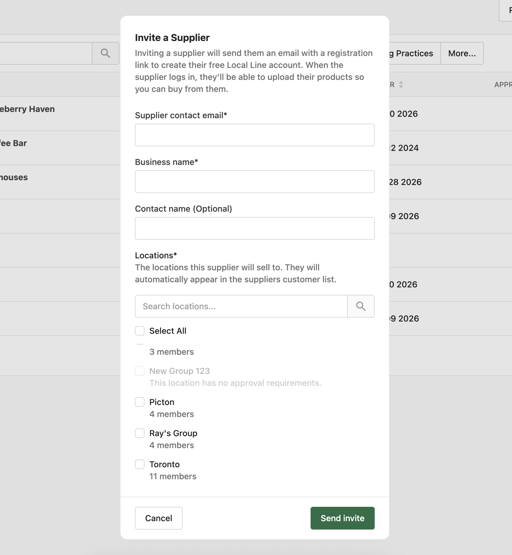
- Click 'Invite suppliers'.
- Enter the suppliers email address, business name, contact name, and the locations you want them to supply.
- Click 'Send invite'.
The supplier receives an email with instructions to either create a Local Line account or, if they're already on Local Line, accept the connection. Once they accept, their products and pricing become available to your team.
A note on supplier adoption: Some suppliers may be unfamiliar with LocalLine. If a key supplier is hesitant, your onboarding manager can join a call with them to explain how LocalLine works and help them get set up. Reach out if you need that support.
Connecting with suppliers already on LocalLine
If a supplier you want to work with already has a LocalLine account, you can connect with them without going through the invitation process.
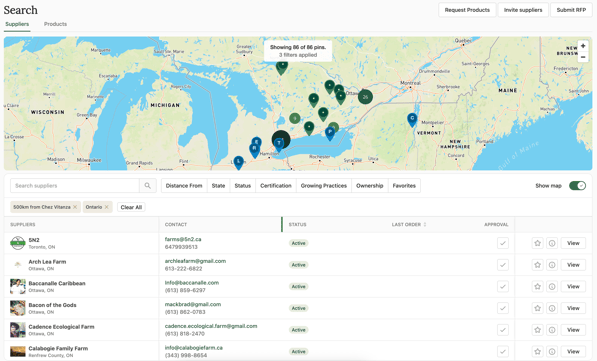
- Go to 'Search'.
- Search by supplier name.
- Click 'View' on the suppliers profile to view products, certifications, order minimums and more.
- In the 'Approval' column, select the checkmark icon, then approve them for the relevant locations.
- The supplier receives your request and approves it on their end, thus establishing the connection and ability to place orders.
Once approved, their catalog appears in your Suppliers tab and your team can start ordering.
Discovering new suppliers
Use 'Search' to find suppliers in your region that match specific sourcing criteria.
- Go to 'Search'.
- Use filters to narrow your search:
- Location - by radius, region, or state/province
- Product category - produce, meat, dairy, beverages, baked goods, and more
- Food safety certifications - GAP, HACCP, organic, third-party audits
- Growing practices - organic, regenerative, pasture-raised, etc.
- Order minimums and delivery schedules
- Browse search results and click into any supplier to view their full profile
- Save suppliers to your shortlist for review with your team
- When you're ready to connect, click 'Request' on the supplier's profile
Reviewing and approving suppliers before they go live
For most buyers, simply connecting with a supplier isn't enough - they need to be vetted before products are made available to ordering staff. LocalLine supports an approval workflow for exactly this.
Before suppliers appear in your team's ordering interface, you can require:
- Supplier approval by a designated approver (e.g., a category manager or compliance lead)
- Submission of required food safety documentation
- Product-level approval before items are orderable
For details on configuring this workflow, see Approving suppliers, Approving products, and Viewing food safety documentation.
Managing your supplier list
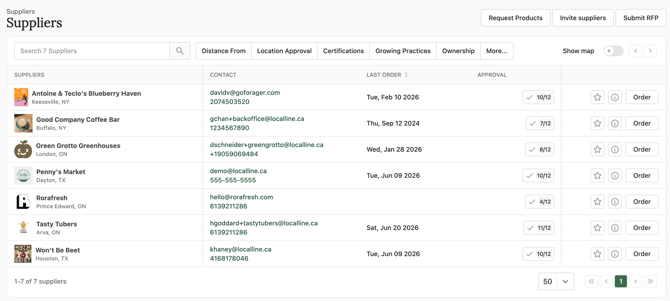
Once suppliers are connected and approved, you can manage them from the 'Suppliers' page.
From here you can:
- View all connected suppliers, their status, and their key contacts
- Filter by product category, location, or approval status
- Click into any supplier to view their catalog, certifications, and order history
- Disconnect from a supplier if you no longer want to work with them
Best practises for building your supplier network
A few tips from buyers who've gone through this process:
- Start with existing relationships. Bringing your current suppliers onto Local Line first preserves continuity while your team learns the platform.
- Layer in new suppliers gradually. Once your team is comfortable, use the Sourcing Network to fill gaps in your catalog and discover new categories.
- Set clear approval criteria up front. Define what food safety documentation and certifications you require before suppliers are activated, so your team is aligned.
- Communicate with suppliers about the transition. A simple email letting suppliers know you're moving ordering to Local Line goes a long way. Your onboarding manager can provide templates.
- Don't rush. Most mid-market buyers add suppliers over weeks or months, not days. Quality beats quantity.
What's next
- How Local Line fits into your procurement workflow - orient your team to the platform
- Approving suppliers - set up your vetting workflow
- Searching for suppliers - deep dive into the Sourcing Network
- Adding & editing users - give your team access to start ordering
Need Help?
For help finding specific suppliers or transitioning existing ones onto Local Line, contact your onboarding manager or email support@localline.ca. Our team can help with outreach to hesitant suppliers, recommendations based on your sourcing needs, and guidance on configuring your approval workflows.