
Your Local Line subscription determines which features you have access to, how many price lists and vendors you can manage, and your payment processing rates. This article covers how to view your subscription, change plans, switch between monthly and annual billing, and manage add-ons.
For an overview of what's included in each plan, see Plan & pricing overview. For invoice history and payment method updates, see Billing & invoices.
Viewing your current subscription
- Click 'Settings' in the bottom-left corner of the back office.
- Select 'Subscription'.
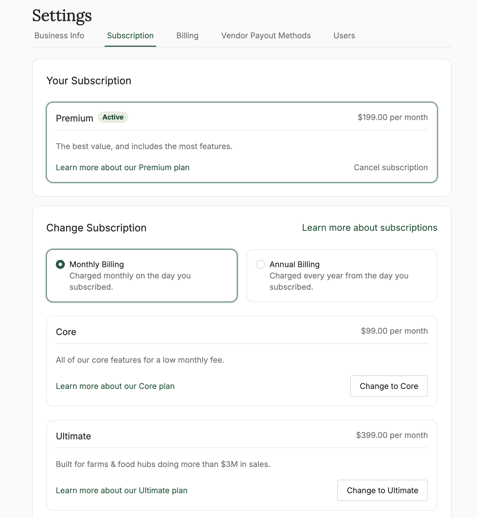
You'll see:
- Your current plan (Core, Premium, or Ultimate)
- Your billing cycle (monthly or annual)
- Your next renewal date
- Any add-ons currently active on your account
Upgrading your plan
You can upgrade at any time. Upgrades take effect immediately, and you're charged a prorated amount for the remainder of your current billing period.
- In the 'Change Subscription' section, view your upgrade options.
- Select the plan you'd like to upgrade to and click 'Upgrade to [plan]'.
- Click 'Confirm upgrade'.
Your new plan features become available immediately. Any add-ons that are included in your new plan (for example, subscriptions and barcode scanning are included in Premium and Ultimate) are automatically removed from your bill as separate line items.
Downgrading your plan
You can downgrade at any time. Downgrades take effect at the end of your current billing period, so you keep access to your current features until then.
- In the 'Change Subscription' section, view your upgrade options.
- Select the plan you'd like to downgrade to and click 'Change to [plan]'.
- Click 'Confirm downgrade'.
Important: Before downgrading, make sure you're under the new plan's limits for price lists and vendors. If you have more price lists or vendors than your new plan allows, you'll need to remove or pay the per-item add-on rate.
For example:
- Downgrading from Premium (5 price lists included) to Core (2 price lists included) means you'll need to either delete 3 price lists or pay $29/month per extra price list.
- Downgrading from Ultimate (50 vendors included) to Premium (10 vendors included) means deleting vendors or paying $5/month per extra vendor.
Switching your billing interval
Annual billing saves 20% compared to monthly. You can switch billing cycles in either direction.
To switch your billing interval:
- Click 'Settings' in the bottom-left corner.
- Click 'Subscription' and locate the 'Change Subscription' section.
- Select 'Monthly billing' or Annual billing'.
- Review the costs.
- Click 'Confirm'.
The switch takes effect immediately, and you'll be charged/prorated the relevan amount that day.
Adding or removing add-ons
Some add ons are applicable across all plan levels. Those include:
- Extra price lists - $29/month per additional price list beyond your plan limit.
- Extra vendors - $5/month per additional vendor beyond your plan limit.
- Communications - $29/month for anyone sending over 4,000 emails per month through LocalLine.
- Custom reports - $9/month per report (all plans)
- Assistant - three monthly pricing options ($9, $29, and $99) depending on your usage levels.
Some add ons are only applicable for the Core plan, and are included in the Premium and Ultimate plans. Those include:
- Subscriptions - $29/month (Core only; included in Premium and Ultimate)
- Barcode Scanner - $29/month (Core only; included in Premium and Ultimate)
- Store Credit - $9/month (Core only; included in Premium and Ultimate)
- POS (Point of Sale) - $9/month (Core only; included in Premium and Ultimate)
To add an add-on:
- Scroll down to the 'Add-on' section in 'Subscriptions'.
- Locate the add-on you want to add.
- Click 'Add to subscription'.
- Click 'Confirm'.
To remove an add-on, scroll up to the 'Your Subscription' section, locate the add-on you want to remove, and click 'Remove from subscription'.
Free trials and new subscriptions
New Local Line accounts include a 7-day free trial of your selected plan, with no credit card required. At the end of the trial, you'll be prompted to add a payment method to continue. If you don't, your account is paused until you do.
Subscription FAQ
Will I be charged immediately when I upgrade?
Yes. Upgrades are prorated and charged immediately to your payment method on file.
Can I cancel an annual plan early?
Annual plans can be cancelled, but they don't refund unused months. Your account stays active until the end of your annual term.
What happens if my payment fails?
Local Line will retry the payment several times and notify you by email. If payment continues to fail, your account may be paused until a working payment method is added.
How do I see what I'll be charged at renewal?
Your next renewal amount appears in Settings > Billing, including any prorated charges from plan changes or add-ons.
Need help?
For questions, contact support@localline.ca.