
Some of your products may be taxable and others not. Fresh produce is often exempt, while prepared foods, beverages, or non-food items may be taxed. LocalLine lets you mark each product as taxable and calculates the right tax on every order.
This article covers how to mark products taxable, how LocalLine determines the tax rate, and when to use a static rate instead.
LocalLine applies the tax settings you choose, but it can't tell you which products are taxable in your region. Check with your accountant or local tax authority if you're unsure.
Where tax settings live
Taxes are set per product, per price list, in the product's Add Product to Price Lists section. This means the same product can be taxable on one price list and not another. That's useful if, for example, you sell to tax-exempt wholesale buyers on a separate price list.
Marking a product as taxable
- Go to the Products page and open the product (or click New Product)
- In the Add Product to Price Lists section, find the price list you want to update
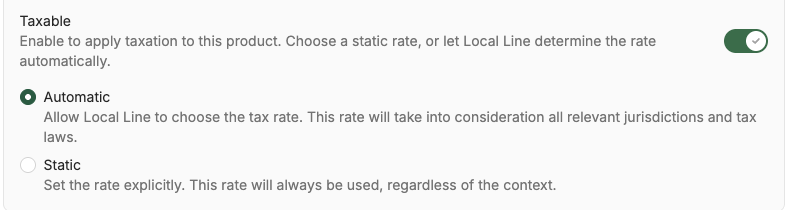
- Turn on the Taxable option
- Choose a tax rate option:
- Automatic: LocalLine determines the rate from the order's fulfillment address
- Static: LocalLine applies a fixed rate you've set
- Repeat for each price list the product is on
- Click Save
How automatic tax rates are calculated
When a product uses the Automatic option, LocalLine calculates the rate based on where the order is going:
- Delivery and shipping orders: The rate is based on the customer's shipping address
- Pickup orders: The rate is based on the address of the pickup location
What's next
- Retail vs. wholesale pricing: set up separate price lists for different customer types
- Pricing & units of measure: set package pricing
Need help? Contact support@localline.ca or use the in-app chat.