
A price list is a storefront for a specific group of customers. Each price list has its own products, prices, payment options, and fulfillment options, all drawn from one shared product catalog.
Most suppliers use price lists to sell through different sales channels. For example, you might use one price list for retail shoppers, one for restaurants, and one for CSA members. Each group sees only the products and prices meant for them, and you manage everything from a single account.
Why price lists matter
Your products don't appear on your storefront on their own. A product needs to be added to a price list before customers can see it. Within a price list, products are usually organized into categories. Products that haven't been added to a category may be shown or hidden, depending on the price list's uncategorized product setting. See Creating & managing categories in a price list.
This means you only maintain one catalog. A single product, like a 5 lb bag of carrots, can appear on several price lists at different prices, without creating duplicate products.
What a price list controls
Each price list has its own settings for:
- Products and categories: which products appear and how they're grouped on the storefront
- Pricing: markups or discounts applied to your base prices, by product or in bulk
- Sales tax: define if a product is taxable and how the taxes are calculated -- either automatically using the fulfillment address, or manually
- Payment methods and terms: which payment methods are offered at checkout, and how many days customers have to pay if you offer a "pay later" option
- Fulfillment plans: which delivery or pickup options are available
- Access: whether anyone can shop, or only approved members
- Ordering window: whether the price list is open or closed for orders, and set a schedule to automate
- Storefront message: a custom message at the top of the page
- Price list update emails: optional recurring emails prompting customers to shop
Because these settings are per price list, you can offer wholesale buyers net-30 payment terms and delivery, while retail customers pay at checkout and pick up at the farm.
Public vs. private price lists
There are two types of price lists:
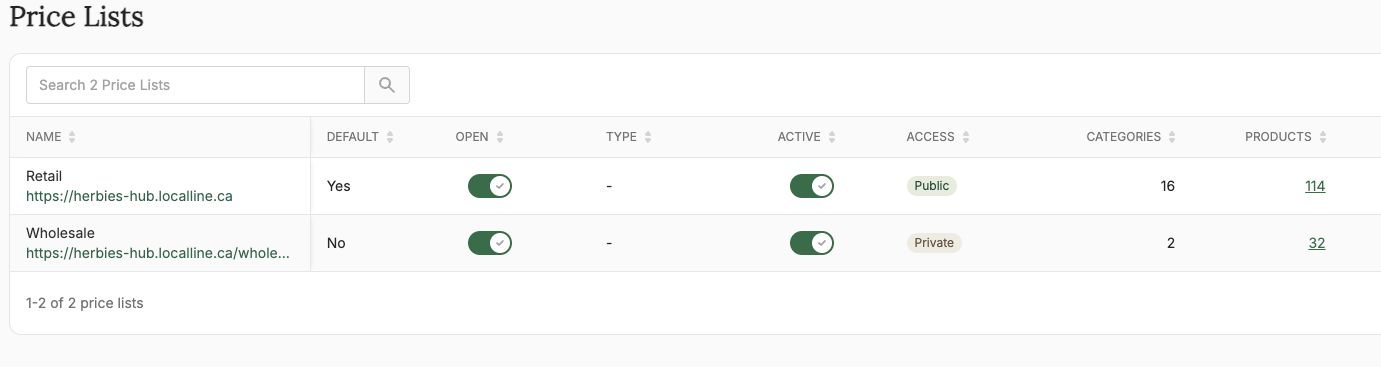
- Public: Anyone can register and shop at any time. Public price lists are typically used for retail and household customers.
- Private: Customers must create an account and request access. You approve each request before they can view products or place orders. Private price lists are typically used for wholesale customers, or anywhere you need to control who can buy.
Your default price list
One price list is your default. It loads when customers visit your main LocalLine store URL. If it's public, search engines like Google can also find it and show it in search results.
Every other price list has its own URL, made of your store URL plus a short URL slug like "wholesale" or "csa". These URLs aren't indexed by search engines, so share them directly with the customers who should use them.
Best practice is to make an active, public price list your default. If your default is private, customers have to request access before they can see anything on your storefront.
Customers on multiple price lists
A customer can be a member of more than one price list. When they log in, they will be taken to the price list that is set as their default, or your default public price list if you have one. Customers can navigate between price lists using the dropdown menu, or the Price Lists option in My Account.
Active vs. open
Two settings control whether customers can use a price list, and they're easy to mix up:
- Active controls whether the price list is available at all. Leave a price list inactive while you're setting it up, or if you're not using it.
- Open controls whether customers can place orders. A closed price list can still be viewed, but customers can't check out, and a "store closed" banner appears at the top of the page.
For example, a weekly market price list might stay active all season, but only be open from Monday to Thursday. See Opening & closing a price list.
Common ways to set up price lists
- Retail and wholesale: a public retail price list at full price, and a private wholesale price list with discounted case pricing
- CSA or members: a private price list for members, with subscription boxes and member pricing
- Pickup locations or markets: separate price lists for each market or pickup site, with different ordering windows and fulfillment options
- Customer-specific pricing: a private price list for one large customer, with negotiated prices
What's next
- Creating & editing price lists: set up your first price list
- Adding & removing products from a price list: choose which products appear
- Assigning customers to price lists: control who sees which price list
Need help? Contact support@localline.ca or use the in-app chat.